
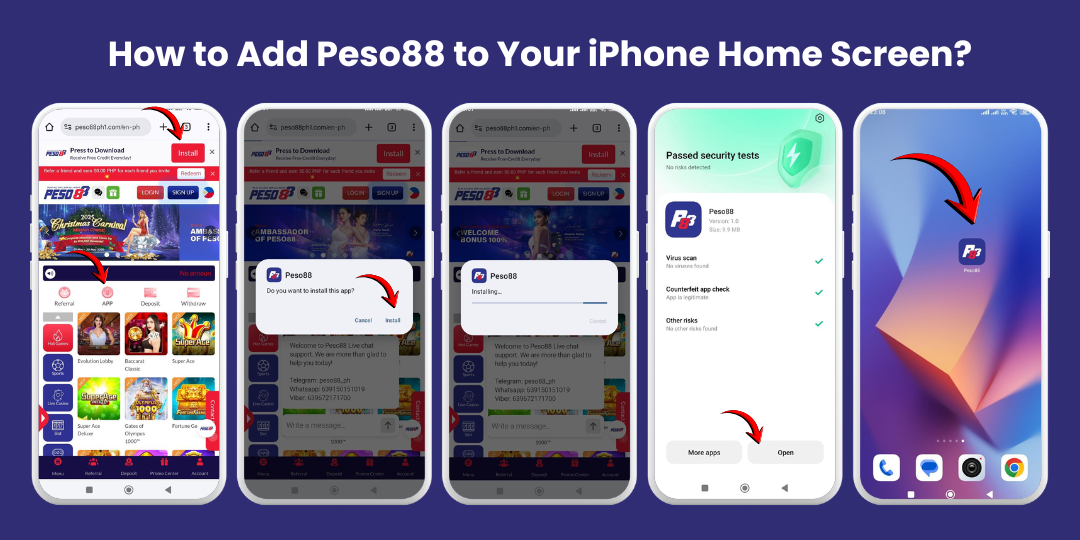
If you play at Peso88 regularly, the fastest way to start your favourite games is to put the casino right on your phone’s Home Screen. Instead of opening a browser, typing the address, logging in, and then finding your game, you just tap one icon—exactly like opening any other app.
On Android, the smoothest way to do this is to download and install the Peso88 APK directly from the official site. Once you tap the “Install” or “App” button, complete the download, and accept the install, the Peso88 icon will appear on your phone screen automatically. From then on, it’s one tap to the lobby.
What This Guide Covers
- Why adding Peso88 to your Android Home Screen is useful
- What the APK does and why it’s different from just using a browser
- How to visit the official site, tap the Install/App button, and complete the download
- How to install the APK and find the icon on your Home Screen
- How to turn on notifications so you don’t miss bonuses and promotions
- Safety tips and troubleshooting if something doesn’t work the first time
Why Add Peso88 to Your Android Home Screen
Many players start by visiting Peso88 in a browser like Chrome or Samsung Internet. That works, but it has a few extra steps:
- Open browser
- Type or search for the site
- Tap the correct result
- Log in
- Navigate to your games
Installing the Peso88 app (APK) from the official site turns the casino into a direct icon on your Android Home Screen. Once it’s installed:
- You tap one icon to launch Peso88
- The experience feels more like a normal app than a website
- Navigation inside the casino is usually smoother and more mobile-friendly
- You can keep the app on your first screen or in a folder with your other games
When notifications are enabled, the app can let you know about new promotions and bonuses, special events, tournaments, and important updates. You stay connected without manually checking the site every day.
Browser vs APK: Why This Guide Focuses on the App
You can access Peso88 in two main ways on Android:
- Through a mobile browser (Chrome, Firefox, Samsung Internet, etc.)
- Through the Peso88 APK, installed as an app
The browser method is useful for a quick test or occasional visit. But for regular players, the APK usually feels better because:
- The layout is designed specifically for mobile
- You don’t need to retype or search the URL
- The app can remember your login (if you choose)
- It’s easier to jump between lobby, cashier, and games
Before You Start: Prepare Your Android Device
A Stable Internet Connection
- Wi‑Fi is ideal if available
- 4G/5G mobile data works too; watch your data usage
- Weak or unstable connections can interrupt the APK download
Enough Storage Space
- Free up space if your phone is full of photos/videos/apps
- Extra space helps games run smoothly later
Allow App Installs from the Browser (If Needed)
Because you’re installing directly from the official Peso88 website instead of Google Play, Android may ask you to allow installs from this source (for example, Chrome). Enable it only for the browser you use to download.
Download and Install the APK
Step 1: Open Your Android Browser
Unlock your phone and open your preferred browser (Google Chrome, Samsung Internet, or another trusted browser).
Step 2: Visit the Official Peso88 Website
Type or paste Peso88 in the address bar or tap it from your bookmarks. Wait for the homepage to load completely so all banners and the Install/App button are visible.
Step 3: Find the “Install” or “App” Button
Look for “Install”, “Download App”, “APK”, or an “App” icon near the top or in a floating bar.
Step 4: Tap the Install/App Button
- Tap Install / Download App / App
- Your browser will prompt to download a file (e.g., peso88.apk)
- Confirm that you want to download the file
Step 5: Wait for the APK Download to Complete
- Watch the download indicator in your browser
- Depending on your connection, this may take seconds to a couple of minutes
Step 6: Allow Installs from This Source (If Prompted)
- If Android blocks the install, tap “Settings” in the prompt
- Enable “Allow from this source” for your browser (Chrome/Samsung Internet)
- Return to the APK and proceed
Step 7: Install the APK and Find the Icon
- Open the downloaded `peso88.apk`
- Tap Install and wait for confirmation
- Find the Peso88 icon on your Home Screen or in the app drawer
Install the Peso88 APK on Android
Once the APK has downloaded, you need to open it and follow Android’s installation steps.
Option A: Install Directly from the Download Notification
- Swipe down from the top of the screen to open your notification shade
- Look for a notification saying something like “peso88.apk downloaded”
- Tap that notification to open the file
Android will now open the Package Installer and show you what the app can do.
Option B: Install from Your Downloads Folder
- Open your phone’s Files or My Files app
- Go to the Downloads folder
- Find the peso88.apk file and tap it
Android will open the installer.
Granting Permission to Install from This Source
The first time you install an APK from your browser, Android might show a message like:
“For your security, your phone is not allowed to install unknown apps from this source.”
This doesn’t mean the app is unsafe; it’s Android’s default rule for apps outside the Play Store.
- Tap Settings or Allow from this source (depending on your device)
- Turn on the switch that allows your browser (for example, Chrome) to install apps
- Go back to the installer screen and tap Install again
Once permission is granted for that source, you don’t usually have to repeat this for future Peso88 updates from the same browser.
Completing the Installation
- After you tap Install, Android will check the APK
- Install the app on your device
- Show a message like “App installed” when it’s done
On the final screen, tap Open to launch Peso88 immediately, or Done to return to your Home Screen and find the new icon.
Find the Peso88 Icon on Your Home Screen
After installation, the Peso88 icon should appear automatically on one of your Home Screen pages or inside your app drawer (depending on your launcher settings).
If you don’t see it right away:
- Swipe up (or tap your apps button) to open the app drawer
- Scroll through the list to find Peso88
- Press and hold the icon, then drag it onto your Home Screen to create a shortcut
Now you have Peso88 on your Home Screen just like any other app. From this point on, tap the icon to open the casino, log in, and jump straight into the lobby.
Enable Notifications: Don’t Miss Bonuses, Promotions, or News
One advantage of having the Peso88 app is the ability to receive notifications—if you choose to allow them. These can include:
- New bonus offers and cashback promos
- Announcements about free spins or special events
- Important maintenance notices, security updates, or feature launches
Allow Notifications When You First Open the App
On first launch, you may see a prompt like “Allow Peso88 to send you notifications?”. If you’re comfortable receiving alerts about promotions and updates, tap Allow. If you tap Deny or change your mind later, you can adjust this in Android settings.
Manage Notifications in Android Settings
- Open Settings
- Go to Apps (or Apps & notifications)
- Find and tap Peso88
- Tap Notifications
From here, you can turn all notifications on or off, and on some devices, choose which categories you want (promos, system alerts, etc.). You can keep notifications enabled but reduce importance or disable marketing messages if your device allows it.
Staying Informed Without Feeling Overwhelmed
- If you enjoy being informed about every promotion, keep them fully on
- If you only want critical alerts, adjust settings accordingly
- If taking a break, temporarily switch notifications off and turn them back on later
Safety Tips: Downloading and Using the Peso88 APK Safely
Always Download from the Official Site
Only download the APK from the official Peso88 website. Avoid unknown domains, “modded” or “hacked” versions, and files shared by strangers in social groups.
Keep Your Device Secure
- Use a screen lock (PIN, fingerprint, or pattern)
- Don’t save passwords where others can see them
- Avoid logging in on public or shared devices
- Never share login or payment details; ignore “guaranteed win” scams
Update the App When Needed
Updates may include performance improvements, new features, and security patches.
- Visit the official homepage
- Tap the Install/App button
- Download the new APK and install over the existing app
- Download only from the official website above
- Enable “Allow from this source” only during install; disable afterwards
- Keep Android updated and use trusted Wi‑Fi when possible
- Delete old APK files from Downloads to save space
Troubleshooting: If Something Doesn’t Work Right
You Can’t See the Install/App Button
- Wait for the page to fully load; try portrait mode
- Scroll up and down; banners may be off‑screen
- Close and reopen the browser; revisit the site later if needed
The APK Won’t Download
- Check your connection; switch Wi‑Fi/mobile data
- Ensure the browser can download files
- Try another browser (e.g., Samsung Internet)
- Note any error message or take a screenshot for support
Installation Is Blocked
- Tap the Settings link in the message
- Allow your browser (Chrome/Samsung Internet) to install apps
- Return and try installing the APK again
The Icon Doesn’t Appear After Install
- Open the app drawer and look for Peso88
- Drag the icon to your Home Screen
- If missing, reinstall the APK
The App Opens but Feels Slow or Laggy
- Check connection quality; close heavy background apps
- Restart the phone to clear temporary issues
- See related guides on loading or lag for more tips
Using the App Responsibly
- Decide on a budget before playing and stick to it
- Treat deposits as entertainment spend, not money to recover
- Take breaks—especially after long sessions or strong emotions
- Use responsible gaming tools to set limits that fit your comfort
Final Thoughts: One‑Tap Access to Peso88 on Android
- No more searching or typing addresses
- Faster access to favourite games and features
- Optional notifications for promos, bonuses, and important news
With a stable connection, a secure device, and responsible play, installing the Peso88 app via APK is the most convenient way to enjoy your online casino experience on Android—one tap from your Home Screen, and you’re in.